• 0 Mein Warenkorb
  • Konto
    • Einloggen
    • Registrieren
    • Passwort vergessen?
  • Kundencenter Home
  • Shop
    • Alle anzeigen
    • Shared Hosting
    • Hosting Agency
    • Ryzen Performance KVM
    • HA KVM VPS
    • Domain
    • SSL Zertifikate
    • Domain registrieren
    • Domain transferieren
  • Ankündigungen
  • Wissensdatenbank
  • Netzwerkstatus
  • Partner
  • Kontaktieren Sie uns
  • Mehr

Wissensdatenbank

Our shared service delivers a powerful, proven platform that’s perfect for hosting your websites.

  1. Support
  2. Wissensdatenbank
  3. Domain Management
  4. How to Remove an Add-on Domain in cPanel

  Kategorien

Backup/Restore
4
Cloudflare (cPanel)
9
CloudLinux (cPanel)
10
cPanel - Control Panel
24
Databases
11
DirectAdmin
48
DNS - Nameservers
6
Domain Management
10
Email
17
FTP
9
Installing a Control Panel
6
Mail Filters & SPAM
8
Mobile
11
Others
3
PayPal
7
Plesk
47
Security
10
SiteWorx (Control Panel)
58
Softaculous
69
SolusVM
18
SSL
5
Virtualizor
19
Webhosting
1
WHM
18
WordPress
17

  Kategorien

  Unterstützung

Supporttickets
Ankündigungen
Wissensdatenbank
herunterladbare
Netzwerkstatus
Ticket öffnen

How to Remove an Add-on Domain in cPanel Drucken

  • 0

1. Log in to your cPanel account.


2. In the Domains section, click on Addon Domains.

3. Locate the addon domain under Modify Addon Domain and click on Remove.
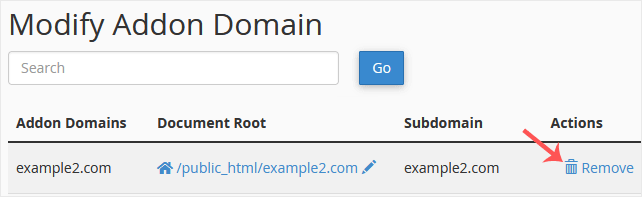

4. Click on Remove once more.


You should see a message that your addon domain has been removed.


War diese Antwort hilfreich?

Verwandte Artikel

How to Create an Alias or Park a Domain in cPanel Note: The domain you want to park must point to the DNS of our server.1. Log in to your cPanel... How to Remove Parked Domains/Aliases in cPanel 1. Log in to your cPanel account. 2. In the Domains section, click on Aliases. 3. Under Remove... How to Create Addon Domains in cPanel Before adding the addon domain, point your addon domain nameservers to your primary domain... How to Redirect an Add-on Domain in cPanel You can redirect your add-on domain to another domain.1. Log in to your cPanel account. 2. In... How to Redirect a Subdomain to an External URL 1. Log in to your cPanel account.2. In the Domains section, click on Subdomains. 3. Under the...
« Zurück

  Unterstützung

Supporttickets
Ankündigungen
Wissensdatenbank
herunterladbare
Netzwerkstatus
Ticket öffnen

Premium quality Unbeatably flexible!

We do not bind you to contracts, we want you to be a customer out of conviction. All servers can be canceled with immediate effect up to one day before the next billing date.

Angebotsübersicht

Concentrate on your business. We take care of the technology!

Navigation

  • Home
  • Customer Panel
  • Support
  • Create a Ticket
  • Contact us

Useful Links

  • Webhosting Overview
  • Agency server
  • Domains
  • Performance VPS
  • HA KVM VPS
  • Dedicated Server

Contact us

  • (+49) 9360 3589995
  • kontakt@nerdscave-hosting.de
  • noc@nerdscave-hosting.de
  • abuse@nerdscave-hosting.de
  • Kontaktieren Sie uns
  • AGB

Urheberrecht: © 2026 Nerdscave Hosting. Alle Rechte vorbehalten.


Lädt...
Lädt...
Sprachwahl
العربية
Azerbaijani
Català
中文
Hrvatski
Čeština
Dansk
Nederlands
English
Estonian
Persian
Français
Deutsch
עברית
Magyar
Italiano
Macedonian
Norwegian
Português
Português
Română
Русский
Español
Svenska
Türkçe
Українська

Währung wählen

€ EUR
$ USD

Passwort generieren

Bitte geben Sie eine Zahl zwischen 8 und 64 für die Passwortlänge ein