• 0 Mein Warenkorb
  • Konto
    • Einloggen
    • Registrieren
    • Passwort vergessen?
  • Kundencenter Home
  • Shop
    • Alle anzeigen
    • AMD Ryzen Dedicated Server
    • AMD EPYC Dedicated Server
    • Intel Dedicated Server
    • Restposten
    • Shared Hosting
    • Hosting Agency
    • Ryzen Performance KVM
    • HA KVM VPS
    • Domain
    • Domain registrieren
    • Domain transferieren
  • Ankündigungen
  • Wissensdatenbank
  • Netzwerkstatus
  • Partner
  • Kontaktieren Sie uns
  • Mehr

Wissensdatenbank

Our shared service delivers a powerful, proven platform that’s perfect for hosting your websites.

  1. Support
  2. Wissensdatenbank
  3. Cloudflare (cPanel)
  4. How to Check if Your Domain is Using Cloudflare in cPanel

  Kategorien

Backup/Restore
4
Cloudflare (cPanel)
9
CloudLinux (cPanel)
10
cPanel - Control Panel
24
Databases
11
DirectAdmin
48
DNS - Nameservers
6
Domain Management
10
Email
17
FTP
9
Installing a Control Panel
6
Mail Filters & SPAM
8
Mobile
11
Others
3
PayPal
7
Plesk
47
Security
10
SiteWorx (Control Panel)
58
Softaculous
69
SolusVM
18
SSL
5
Virtualizor
19
Webhosting
1
WHM
18
WordPress
17

  Kategorien

  Support

Supporttickets
Ankündigungen
Wissensdatenbank
Downloads
Netzwerkstatus
Ticket öffnen

How to Check if Your Domain is Using Cloudflare in cPanel Drucken

  • 0


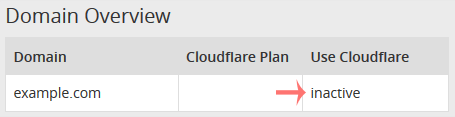
You can check the status of your Cloudflare in cPanel.


1. Log in to your cPanel account.


2. In the Software section, click on Cloudflare.


3. Click on Sign in Here to access your Cloudflare account.

 

4. Click on Domains in the menu.

 

5. Below Use Cloudflare, if your domain uses it, the status should be Active. If it is inactive, it means your domain is not using Cloudflare.


War diese Antwort hilfreich?

Verwandte Artikel

How to Access Cloudflare From cPanel   You can access and manage Cloudflare in cPanel. Follow this tutorial to learn how to access... How to Enable Cloudflare on Your Domain in cPanel   1. Log in to your cPanel account.   2. In the Software section, click on Cloudflare.... How to Enable or Disable Cloudflare IPv6 Compatibility in cPanel   1. Log in to your cPanel account.   2. In the Software section, click on Cloudflare.... How to Enable or Disable Cloudflare's Always Online Feature in cPanel   Did you ever notice that sometimes, when your server goes offline, Cloudflare keeps serving... How to Change Security Level of Cloudflare Domain in cPanel   You can increase or decrease the Cloudflare security level from cPanel.   Cloudflare has...
« Zurück

  Support

Supporttickets
Ankündigungen
Wissensdatenbank
Downloads
Netzwerkstatus
Ticket öffnen

Premium quality Unbeatably flexible!

We do not bind you to contracts, we want you to be a customer out of conviction. All servers can be canceled with immediate effect up to one day before the next billing date.

Angebotsübersicht

Concentrate on your business. We take care of the technology!

Navigation

  • Home
  • Customer Panel
  • Support
  • Create a Ticket
  • Contact us

Useful Links

  • Webhosting Overview
  • Agency server
  • Domains
  • Performance VPS
  • HA KVM VPS
  • Dedicated Server

Contact us

  • (+49) 9360 3589995
  • kontakt@nerdscave-hosting.de
  • noc@nerdscave-hosting.de
  • abuse@nerdscave-hosting.de
  • Kontaktieren Sie uns
  • AGB

Copyright © 2026 Nerdscave Hosting. All Rights Reserved.


Lädt...
Lädt...
Sprachwahl
Nederlands
English
Français
Deutsch

Währung wählen

€ EUR
$ USD

Generate Password

Please enter a number between 8 and 64 for the password length